


Easy Ways to Set Up a Workspace That Helps Your Back and Neck
GUEST POST.
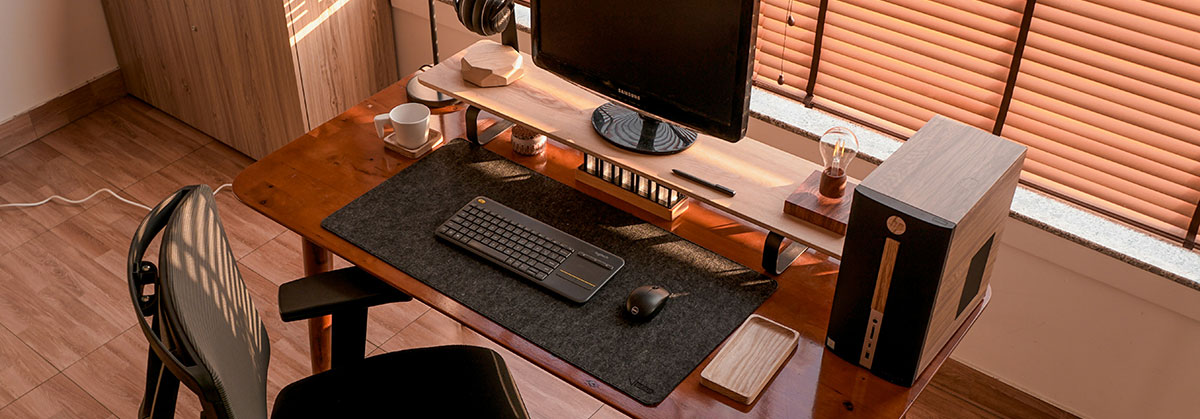
Image Photo by Lộc Nguyễn on Unsplash
Creating a workspace that supports your body is a smart move for long-term comfort and wellbeing. Spending hours at a desk can often lead to neck, shoulder, or lower back tension, particularly when the workstation isn’t set up correctly. Over time, these small aches can develop into ongoing issues that affect your productivity and overall health.
The good news is that building a back-friendly work environment doesn’t require major changes or expensive equipment. With a few simple adjustments, you can significantly reduce strain, improve posture and feel more comfortable throughout your day.
Why Ergonomics Makes a Difference
Many people overlook the importance of ergonomics until discomfort becomes unavoidable. Poor posture, especially during long periods of sitting, can cause a chain reaction of physical stress. Without proper support, it’s easy to fall into a slouched position that places pressure on your spine and tightens neck and shoulder muscles.
Investing in ergonomic furniture helps your body stay aligned, reducing that physical load and allowing you to work more comfortably. Whether you work from home, in an office, or split your time between the two, your setup matters. Partnering with an office furniture company in Edinburgh is a helpful way to find well-designed pieces that suit your needs and promote healthier habits.
Choosing Furniture That Supports Your Spine
Your chair is central to creating a supportive workspace. Look for one that offers adjustable height and lumbar support. These features allow you to align the chair with your body so that your lower back maintains its natural curve, reducing pressure on the spine and muscles.
If your feet don’t comfortably touch the ground, use a footrest to relieve pressure on your hips and legs. Desk height also plays a role in how your body feels. Your elbows should rest at a 90-degree angle, with forearms flat on the desk surface. A standing desk or adjustable workstation can offer additional flexibility, helping you stay more active during the day.
Screen placement is just as important. Your monitor should be at eye level and about an arm’s length away. This helps prevent neck strain by keeping your head in a natural, upright position.
Seating Options That Encourage Good Posture
Not everyone finds comfort in traditional office chairs. For some, alternative seating options offer better support. Chairs with adjustable lumbar support and seat depth can help tailor the fit to your body, making it easier to sit upright for longer periods.
Kneeling chairs redistribute your weight and take pressure off the lower back. Saddle seats help open up the hip angle and encourage better posture by aligning the spine naturally. While these options may take some getting used to, they can be worth exploring if you struggle with conventional seating.
Arranging Your Workspace for Comfort
The layout of your workspace plays a big part in how your body feels during the day. Ideally, your hips, knees and ankles should all form 90-degree angles when seated. This setup helps reduce joint stress and supports a more neutral posture.
Monitor height is especially important. A screen that’s too low or too far away can cause you to lean forward, which strains your neck and upper back. Raising your monitor with a stand or using an adjustable arm allows you to keep it at eye level.
If you spend a lot of time on phone calls, consider using a headset or speakerphone. Holding a handset between your shoulder and ear puts unnecessary pressure on the neck and can quickly lead to discomfort. It’s also helpful to store frequently used items, like pens or notebooks, within arm’s reach to avoid excessive reaching or twisting.
Creating an Organised and Functional Desk Layout
A well-organised desk supports both comfort and productivity. Keep essential tools like your keyboard and mouse close to avoid overextending your arms. These should sit in your primary work zone, allowing you to type and click without strain.
Secondary items, such as documents or files, can be stored a little further away to help reduce clutter. Separating your desk into zones for frequent and occasional use can make your workday more efficient and physically comfortable.
If you regularly print documents, placing your printer slightly away from your desk can encourage natural movement. Taking a few steps to collect papers can help break up long periods of sitting and promote better circulation.
Accessories That Enhance Ergonomic Comfort
Adding the right accessories to your setup can make a noticeable difference. Ergonomic keyboards help keep your wrists in a neutral position, reducing strain during typing. Some also include built-in wrist rests for extra comfort.
When it comes to your mouse, look for one that suits the shape and size of your hand. Vertical or pen-style designs can help reduce pressure on the wrist and promote a more natural grip.
If you use a laptop, raise the screen with a stand and use an external keyboard and mouse. This arrangement protects your neck by keeping your head upright and your eyes level with the screen.
Tidying cables with clips or cable trays helps reduce clutter and lowers the risk of tripping or awkward reaching.
Healthy Habits That Work With Good Furniture
Even with a great setup, staying in one position for too long is hard on the body. Taking short breaks to move and stretch keeps your muscles flexible and your energy levels up. Try setting reminders every 45 minutes to get up, stretch your shoulders, or take a few deep breaths.
There are plenty of tools available to help you stay on track with breaks, including apps or wearable devices that prompt you to move. These habits reduce stiffness and can help prevent the kinds of aches that build up over the day.
Safe lifting techniques also matter, even in office settings. Bend your knees when picking up anything heavy and keep the object close to your body. These small adjustments can go a long way toward protecting your lower back.
Encouraging Regular Movement
Regular movement throughout the day supports better health and comfort. Standing for a few minutes each hour or walking to another part of your workspace keeps your muscles active and your joints mobile.
You don’t need a gym routine to improve circulation or posture. Simple stretches or seated leg movements can be done discreetly at your desk. Over time, these short breaks improve flexibility and prevent stiffness.
It’s also a good idea to review your setup occasionally. As your workload or routine changes, your workstation might need small adjustments. Taking time every few months to assess your space ensures that it continues to support your comfort and efficiency.
Upgrade Your Workspace, Upgrade Your Comfort
A few thoughtful changes to your desk setup can help you avoid strain, improve your posture and work more comfortably each day. Choosing supportive furniture, staying organised and building movement into your routine makes a real difference to your wellbeing.
If you’ve been dealing with persistent aches or fatigue at your desk, now is a great time to rethink your workspace. Start with the essentials, adjust what’s not working, and commit to healthy habits. Your back and neck will thank you for it.
This is a guest post and therefore these are not necessarily the views of Index Digital.
#ErgonomicFurniture #HomeDesks #IndexDigital